Skip to content
IT Beginner
  • Home
  • Server
  • WordPress
IT Beginner
  • Lab 1-3: Configuring EtherChannel
    ICND2 Labs

    Lab 1-3: Configuring EtherChannel

    ByLinux Tips 08/08/2018

    Physical Topology Diagram Visual Topology Command List Task 1: EtherChannel configuration Visual Topology Command List Command Description Channel-group id…

    Read More Lab 1-3: Configuring EtherChannelContinue

  • Lab 1-2: Optimizing STP
    ICND2 Labs

    Lab 1-2: Optimizing STP

    ByLinux Tips 07/08/2018

    Physical Topology Diagram Visual Topology Command List Task 1: Verify STP operation. Task 2: Manipulating Root Bridge selection….

    Read More Lab 1-2: Optimizing STPContinue

  • Lab 1-1: VLANs and Trunks Connections
    ICND2 Labs

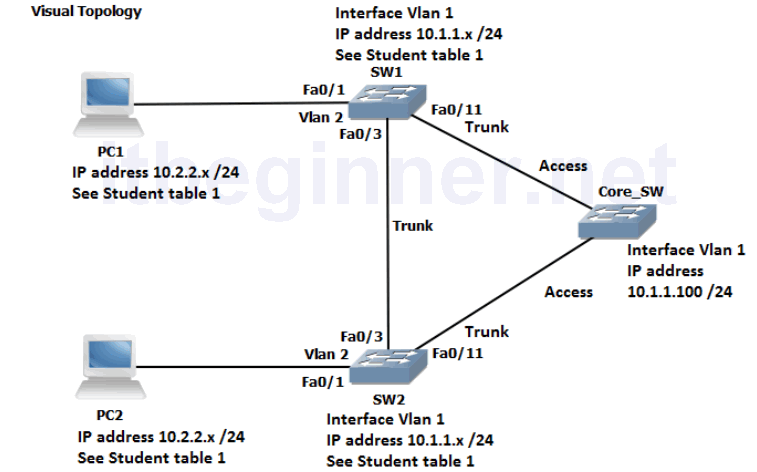
    Lab 1-1: VLANs and Trunks Connections

    ByLinux Tips 06/08/2018

    Physical Topology Diagram Visual Topology Command List Task 1: Reload and check that the Switch is set to…

    Read More Lab 1-1: VLANs and Trunks ConnectionsContinue

  • Lab 5-2: Configure IPv6 Routing
    ICND1 Labs

    Lab 5-2: Configure IPv6 Routing

    ByLinux Tips 05/08/2018

    Visual Topology Command Line Command Description ipv6 ospf process id area id Enables OSPFv3 on the interface ipv6…

    Read More Lab 5-2: Configure IPv6 RoutingContinue

  • Lab 5-1: Configure basic IPv6
    ICND1 Labs

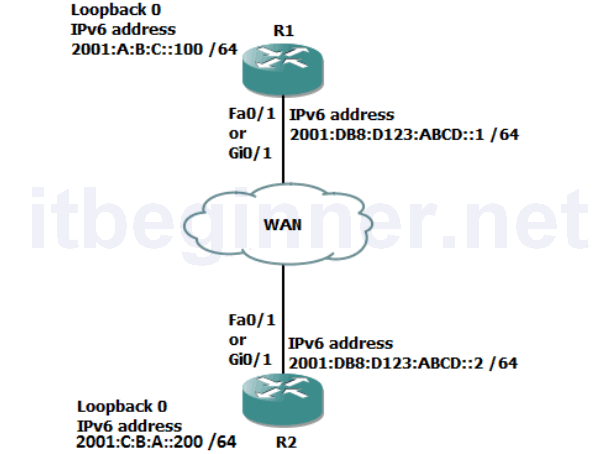
    Lab 5-1: Configure basic IPv6

    ByLinux Tips 04/08/2018

    Visual Topology Command Line Command Description ipv6 address address / mask ipv6 unicast-routing ping address show ipv6 interface…
    Read More Lab 5-1: Configure basic IPv6Continue

  • Lab 4-3: Implementing OSPF
    ICND1 Labs

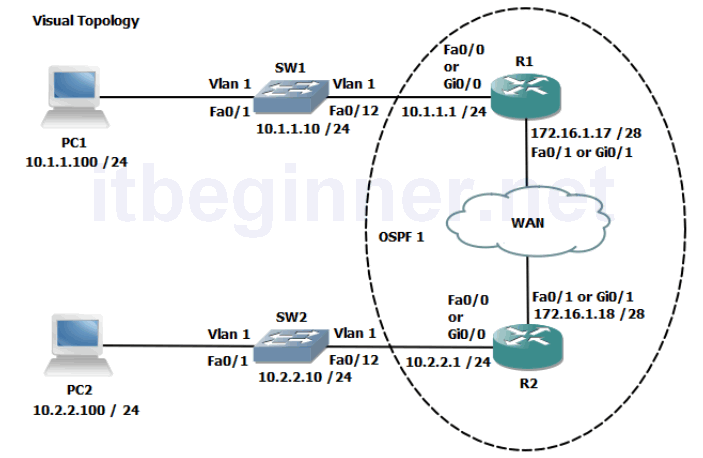
    Lab 4-3: Implementing OSPF

    ByLinux Tips 03/08/201803/08/2018

    Visual Topology Command Line Command Description Erase startup-config or Write erase Removes the startup-configuration from NVram Hostname Defines…
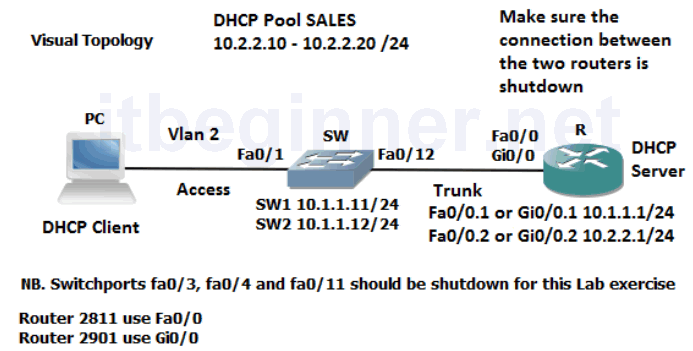
    Read More Lab 4-3: Implementing OSPFContinue

  • Lab 4-2: Using a Router to provide DHCP Services
    ICND1 Labs

    Lab 4-2: Using a Router to provide DHCP Services

    ByLinux Tips 02/08/2018

    Visual Topology Command Line Command Description default-router address dns-server address ip dhcp excluded-address ip address [last ip address]…
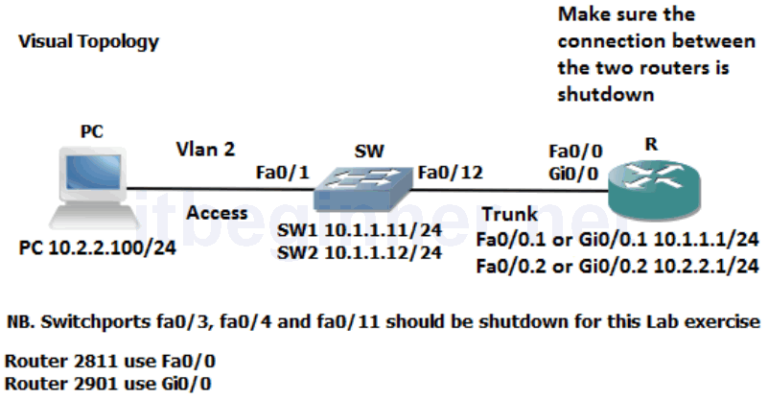
    Read More Lab 4-2: Using a Router to provide DHCP ServicesContinue

  • Lab 4-1: Enhancing a Switched Network
    ICND1 Labs

    Lab 4-1: Enhancing a Switched Network

    ByLinux Tips 01/08/2018

    Visual Topology Command Line Command Description encapsulation dot1q vlan Enables IEEE 802.1Q encapsulation on a routers sub-interface no…
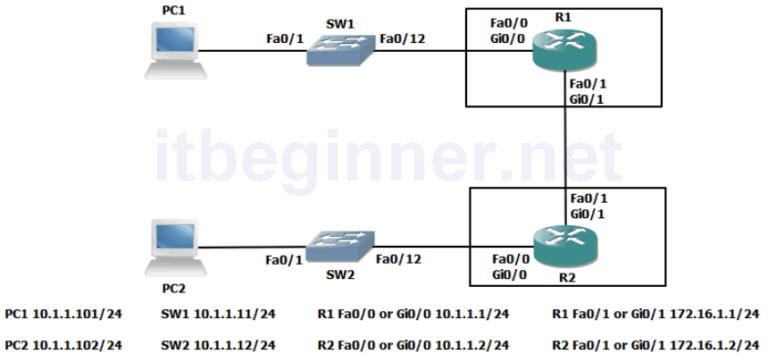
    Read More Lab 4-1: Enhancing a Switched NetworkContinue

  • Lab 3-3: Using ACLs to filter IP based traffic
    ICND1 Labs

    Lab 3-3: Using ACLs to filter IP based traffic

    ByLinux Tips 31/07/201831/07/2018

    Visual Topology Command Line Command Description Interface loopback0 Creates an internal interface ip access-group acl name [in/out] Binds…
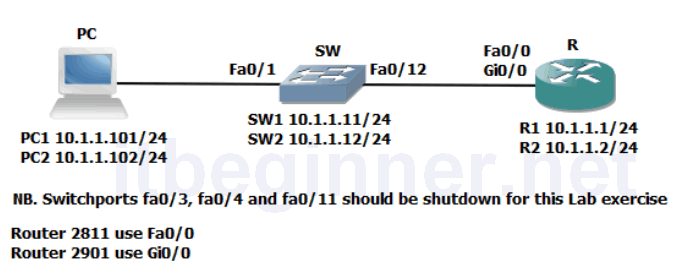
    Read More Lab 3-3: Using ACLs to filter IP based trafficContinue

  • Lab 3-2: Device Hardening
    ICND1 Labs

    Lab 3-2: Device Hardening

    ByLinux Tips 30/07/201830/07/2018

    Visual Topology Command Lis Command Description [no] cdp enable Enables or disables CDP on an interface show cdp…
    Read More Lab 3-2: Device HardeningContinue

Page navigation

Previous PagePrevious 1 2 3 4 5 … 15 Next PageNext

Recent Posts

  • Cisco Packet Tracer 9.0.0 Open BETA Download
  • Download Cisco Packet Tracer 8.2.2 (Latest version 2024)
  • Introduction to Networks Instructor Materials – Chapter 11: It’s a Network
  • Introduction to Networks Instructor Materials – Chapter 10: Application Layer
  • Introduction to Networks Instructor Materials – Chapter 9: Subnetting IP Networks

© 2026 IT Beginner

  • Home
  • Server
  • WordPress
Search